Status Flow & Lifecycle
The complete visit lifecycle from empty to paid
Every visit in Cadence follows a defined lifecycle. Understanding this flow helps you know what to expect at each stage.
The Main Flow
Empty → Logged (by Logger) → Billed (by Billing) → Paid (by Remittance)
Each step is handled by a different role, creating a clear chain of accountability.
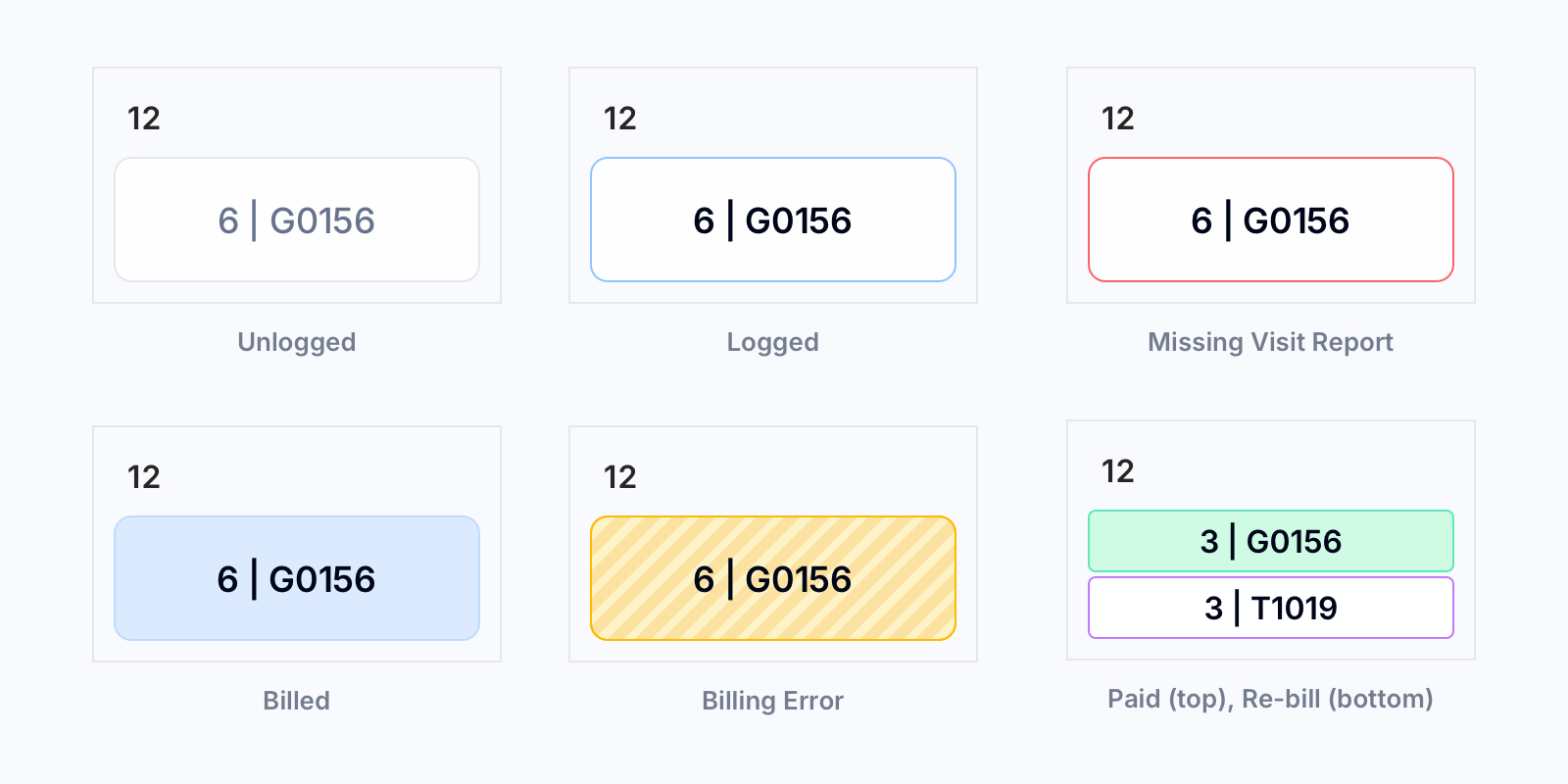
Rejected Claim Branch
When a payor fully rejects a billed claim:
Billed → Adjust Payment (paid = 0, by Remittance) → Re-bill (purple) → Re-Billed (by Billing) → Paid (by Remittance)
For RNA visits, Remittance uses a simple "Re-bill" toggle instead of the Adjust Payment form.
Correction Branch (Partial Payment, Overpayment, etc.)
When payment doesn't match what was billed, Remittance uses the Adjust Payment form:
Billed → Adjust Payment (by Remittance) → Paid (corrected units) + optional Re-bill → Re-Billed (by Billing) → Paid (by Remittance)
Unpayable (Denied Recertification)
Care continues while Authorizations waits on a recertification, and the approval usually lands backdated so the work gets paid. Sometimes the recert is denied. Every date already worked will never be paid, and there is nothing to re-submit.
Remittance marks those visits Unpayable (maroon). Three things stay true:
- The visits stay logged and billed. The records are valid and they are not deleted.
- The caregiver is still paid. Payroll runs off the timesheet, so unpayable visits count toward hours and appear on the statement like any other work.
- They stop counting as money owed, so they leave the remittance queue and the binder's collectable totals.
Use Unpayable on a single visit from the day panel, or on a whole date range with the bulk action. It takes one click, the same as Mark Paid. Most offices also add a note on those dates recording what the payer said, which you do the same way you add any other calendar note.
If a denial is later overturned, undo it. Each visit returns to the status it was written off from: a billed claim goes back to Billed, and one that was already in the re-bill queue goes back to Re-bill.
Missed Visits
When a visit report has not been turned in, the Logger can enter the caregiver and units missed and mark the visit as "Missed". This will explicitly mark the visit with a red border and add the visit to tracker of all current missing visit reports for the patient.
For more information, see: Logger Guide: Finding Missing Timesheets
Who Can Do What
| Action | Allowed Roles |
|---|---|
| Log units | Logger, Admin |
| Undo logged → unlogged | Logger, Admin |
| Mark as billed | Billing, Admin |
| Undo billed → logged | Billing, Admin |
| Mark as paid | Remittance, Admin |
| Undo paid → billed | Remittance, Admin |
| Adjust payment | Remittance, Admin |
| Re-bill (re-submit) | Billing, Admin |
| Mark as unpayable | Remittance, Admin |
| Undo unpayable | Remittance, Admin |
Unverified Billing
When a binder allows billing before visit reports are received:
Empty → Billed (unverified, by Billing) → Paid (by Remittance) → Logger logs actual units → Billing Error flagged if units differ
The logger sees unverified items as missed (red border). Once they enter the actual units:
- If units match what was billed — the visit transitions cleanly, no further action
- If units differ — the discrepancy is flagged as a Billing Error for Remittance to resolve via the Adjust Payment form (pre-populated with suggested values)
Important Rules
- Each role can only undo their own step — Billing can't undo paid, Remittance can't undo billed
- Admin can perform any action across all roles
- Once a day is paid, only Remittance or Admin can change it
- Undo goes back one step only — you can't skip from paid directly to logged
The color-coded calendar makes the current status of every day visible at a glance. Green means done/paid, blue means in progress, white means it needs attention.